LegacyLink Developer Guide
Acknowledgements
This project is based on the AddressBook-Level3 project created by the SE-EDU initiative.
Setting up, getting started
Refer to the guide Setting up and getting started.
Design
Architecture
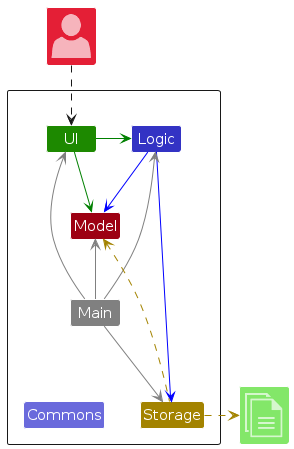
The Architecture Diagram given above explains the high-level design of the App.
Given below is a quick overview of main components and how they interact with each other.
Main components of the architecture
Main (consisting of classes Main and MainApp) is in charge of the app launch and shut down.
- At app launch, it initializes the other components in the correct sequence, and connects them up with each other.
- At shut down, it shuts down the other components and invokes cleanup methods where necessary.
The bulk of the app's work is done by the following four components:
UI: The UI of the App.Logic: The command executor.Model: Holds the data of the App in memory.Storage: Reads data from, and writes data to, the hard disk.
Commons represents a collection of classes used by multiple other components.
How the architecture components interact with each other
The Sequence Diagram below shows how the components interact with each other for the scenario where the user issues the command delete 1.
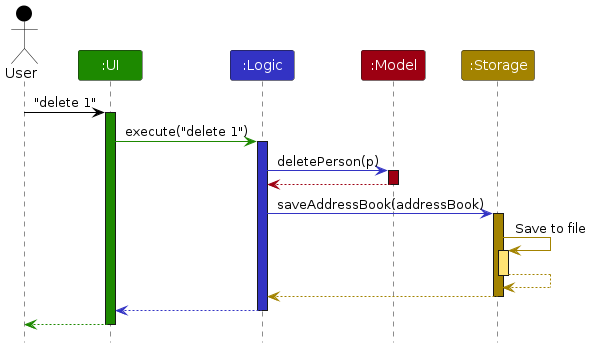
Each of the four main components (also shown in the diagram above),
- defines its API in an
interfacewith the same name as the Component. - implements its functionality using a concrete
{Component Name}Managerclass (which follows the corresponding APIinterfacementioned in the previous point.
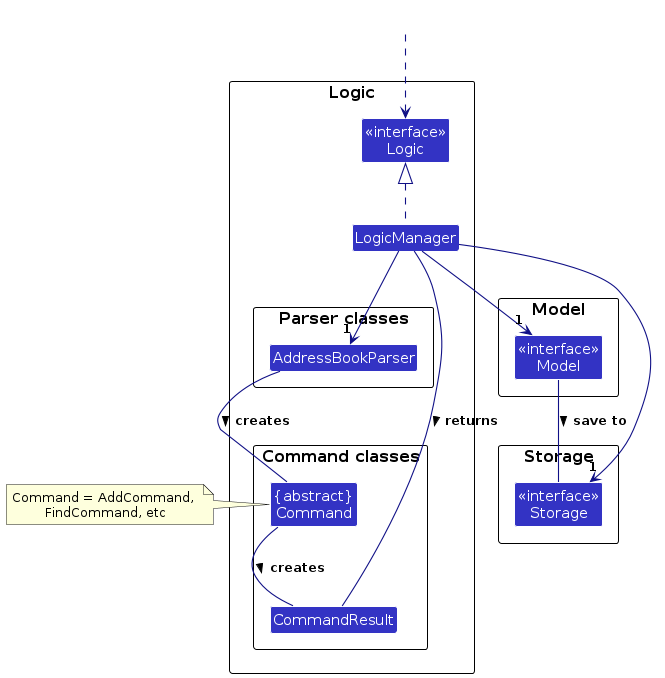
For example, the Logic component defines its API in the Logic.java interface and implements its functionality using the LogicManager.java class which follows the Logic interface. Other components interact with a given component through its interface rather than the concrete class (reason: to prevent outside component's being coupled to the implementation of a component), as illustrated in the (partial) class diagram below.
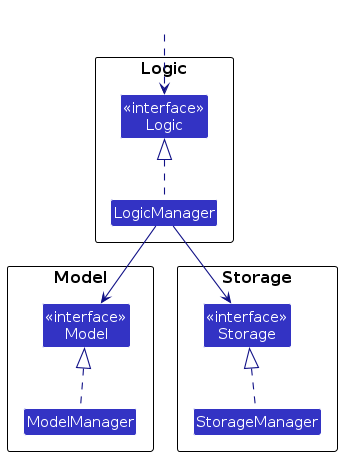
The sections below give more details of each component.
UI component
The API of this component is specified in Ui.java
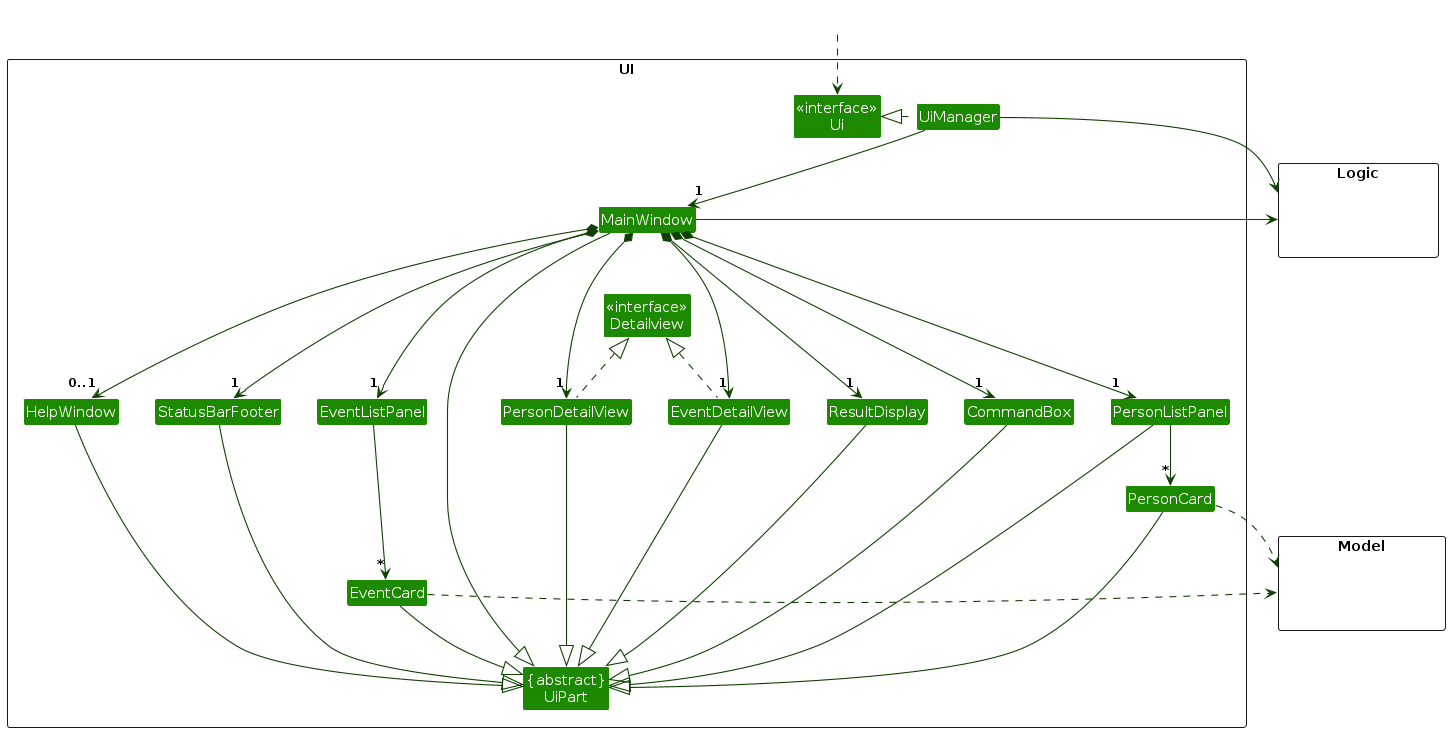
The UI consists of a MainWindow that is made up of parts e.g.CommandBox, ResultDisplay, PersonListPanel, StatusBarFooter etc. All these, including the MainWindow, inherit from the abstract UiPart class which captures the commonalities between classes that represent parts of the visible GUI.
The UI component uses the JavaFx UI framework. The layout of these UI parts are defined in matching .fxml files that are in the src/main/resources/view folder. For example, the layout of the MainWindow is specified in MainWindow.fxml
The UI component,
- executes user commands using the
Logiccomponent. - listens for changes to
Modeldata so that the UI can be updated with the modified data. - keeps a reference to the
Logiccomponent, because theUIrelies on theLogicto execute commands. - depends on some classes in the
Modelcomponent, as it displaysPersonobject residing in theModel.
Logic component
API : Logic.java
Here's a (partial) class diagram of the Logic component:
The sequence diagram below illustrates the interactions within the Logic component, taking execute("delete 1") API call as an example.
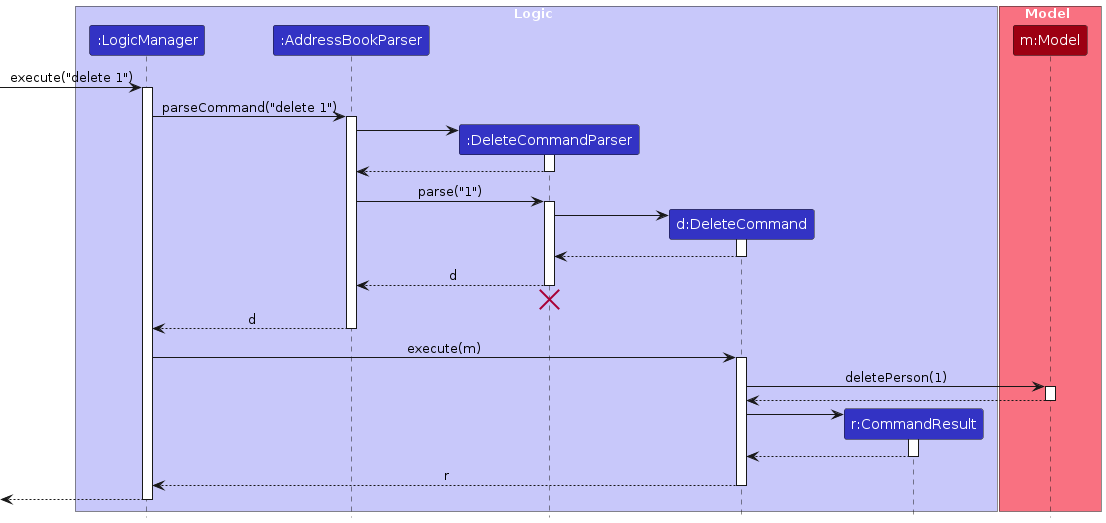
Note: The lifeline for DeleteCommandParser should end at the destroy marker (X) but due to a limitation of PlantUML, the lifeline continues till the end of diagram.
How the Logic component works:
- When
Logicis called upon to execute a command, it is passed to anAddressBookParserobject which in turn creates a parser that matches the command (e.g.,DeleteCommandParser) and uses it to parse the command. - This results in a
Commandobject (more precisely, an object of one of its subclasses e.g.,DeleteCommand) which is executed by theLogicManager. - The command can communicate with the
Modelwhen it is executed (e.g. to delete a person).
Note that although this is shown as a single step in the diagram above (for simplicity), in the code it can take several interactions (between the command object and theModel) to achieve. - The result of the command execution is encapsulated as a
CommandResultobject which is returned back fromLogic.
Here are the other classes in Logic (omitted from the class diagram above) that are used for parsing a user command:
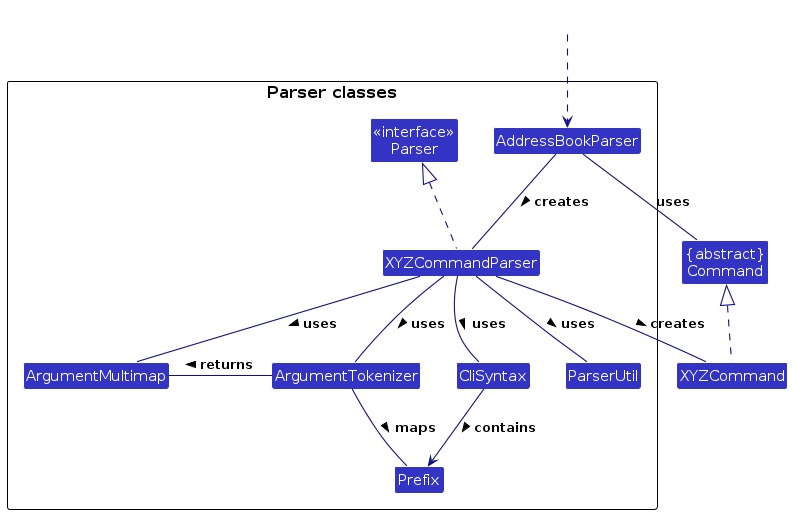
How the parsing works:
- When called upon to parse a user command, the
AddressBookParserclass creates anXYZCommandParser(XYZis a placeholder for the specific command name e.g.,AddCommandParser) which uses the other classes shown above to parse the user command and create aXYZCommandobject (e.g.,AddCommand) which theAddressBookParserreturns back as aCommandobject. - All
XYZCommandParserclasses (e.g.,AddCommandParser,DeleteCommandParser, ...) inherit from theParserinterface so that they can be treated similarly where possible e.g, during testing.
Model component
API : Model.java
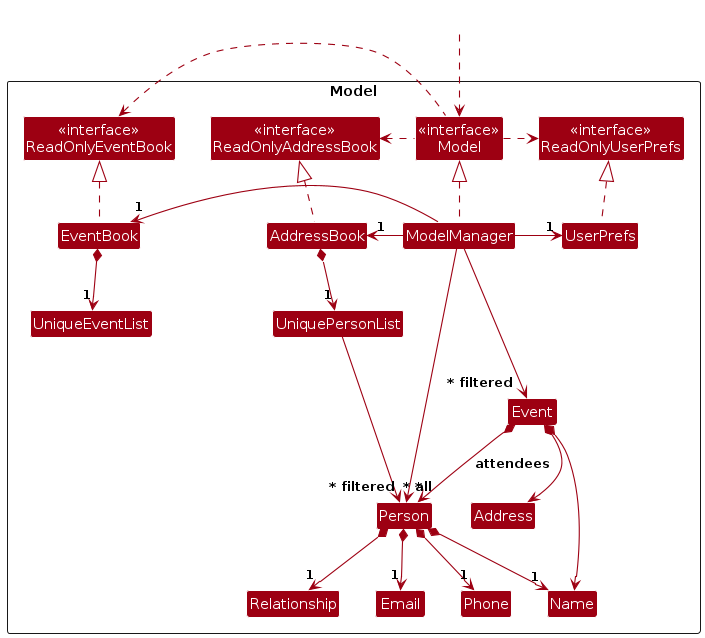
The Model component,
- stores the address book data i.e., all
Personobjects (which are contained in aUniquePersonListobject). - stores the currently 'selected'
Personobjects (e.g., results of a search query) as a separate filtered list which is exposed to outsiders as an unmodifiableObservableList<Person>that can be 'observed' e.g. the UI can be bound to this list so that the UI automatically updates when the data in the list change. - stores a
UserPrefobject that represents the user’s preferences. This is exposed to the outside as aReadOnlyUserPrefobjects. - does not depend on any of the other three components (as the
Modelrepresents data entities of the domain, they should make sense on their own without depending on other components)
Storage component
API : Storage.java
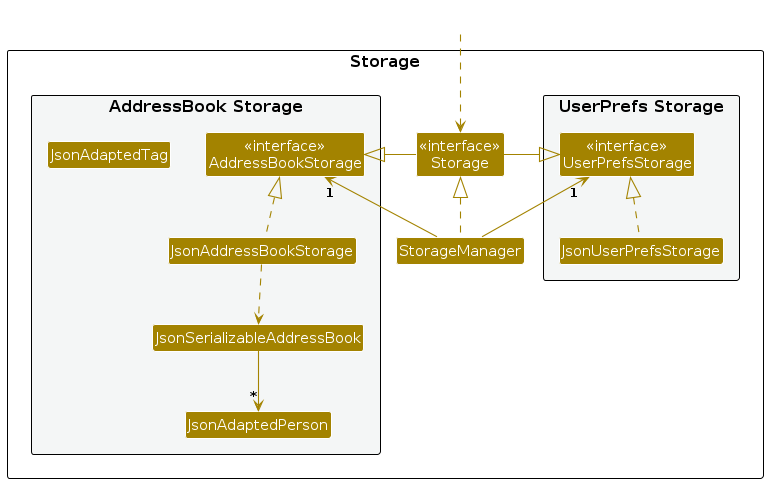
The Storage component,
- can save both address book data and user preference data in JSON format, and read them back into corresponding objects.
- inherits from both
AddressBookStorageandUserPrefStorage, which means it can be treated as either one (if only the functionality of only one is needed). - depends on some classes in the
Modelcomponent (because theStoragecomponent's job is to save/retrieve objects that belong to theModel)
Common classes
Classes used by multiple components are in the seedu.address.commons package.
Documentation, logging, testing, configuration, dev-ops
Appendix: Requirements
Product scope
Target user profile:
- Has a large extended family with numerous contacts to manage
- Values maintaining connections with various family branches (direct family, paternal side, maternal side, in-laws)
- Organizes or participates in frequent family gatherings and events
- Desires an efficient way to keep family contact information up-to-date
- Appreciates tools that help navigate complex family dynamics
- Is comfortable using digital tools for personal organization
- Ranges from young adults to seniors who want to stay connected with their extended family
Value proposition: LegacyLink offers a comprehensive family contact management system that simplifies the organization of large family trees, streamlines event planning, and helps maintain family connections more effectively than traditional contact management methods. It revolutionizes the "family experience"!
User stories
Priorities: High (must have) - * * *, Medium (nice to have) - * *, Low (unlikely to have) - *
| Priority | As a … | I want to … | So that I can… |
|---|---|---|---|
* * * | As a user | add contact information of the family member | I can retrieve their contact information |
* * * | As a user | add the relationship of the family members | I can know the relationship between people |
* * * | As a user | update the information of family members in the contact list | I can keep the latest information of my family |
* * * | As a user | add events tied to family members (e.g birthdays) | I can set reminders on that date so that I don't ever forget about it |
* * * | As an organizer | track RSVPs and attendance for each event | I know who is attending the event and can plan accordingly |
* * * | As an organizer | schedule family events | I can plan and coordinate events |
* * * | As an organizer | see the contact list of family members | I know whose contacts that I have not added yet and add them |
* * * | As an organizer | update the event's information after creating it | attendees can see the updated event details |
* * * | As an organizer | delete an event | I can cancel an event |
Use cases
(For all use cases below, the System is the LegacyLink and the Actor is the user, unless specified otherwise)
Use case 1: Add contact
MSS
User enters name, phone number, email and relationship of the contact.
User confirms details of the contact.
System adds the contact.
Use case ends.
Extensions
1a. User enters an invalid name, phone number, email, and/or relationship.
Use case resumes at step 1.
3a. The addition of contact causes duplicate contacts.
- 3a1. System shows an error message.
Use case resumes at step 2.
*a. At any time, User chooses to cancel adding a contact Use case ends.
Use case 2: Delete contact
MSS
User views all contacts UC-3.
System shows a list of persons.
User requests to delete a specific contact in the list.
System deletes the person.
Use case ends.
Extensions
2a. The list is empty.
Use case ends.
3a. The given index is invalid.
3a1. System shows an error message.
Use case resumes at step 2.
Use case 3: View all contacts
MSS
User requests to view the list of contacts.
The system displays a list of all contacts.
User can scroll through the list to see all the contact listed.
User can click on a contact to view more details.
Use case ends.
Use case 4: Update information of contact
MSS
User lists all contacts UC-3.
User selects contact to update.
User can edit name / phone number / email / relationship of contact.
System registers the changes.
Use case ends.
Extensions
2a. The given index is invalid.
1a1. System shows an error message.
Use case resumes at step 2.
3a. The changed details are invalid.
3a1. System shows an error message.
Use case resumes at step 3.
3b. User does not change contact details.
3b1. System shows an error message.
Use case resumes at step 3.
4a. The edited contact causes duplicate contacts.
4a1. System shows an error message.
Use case resumes at step 3.
*a. At anytime, User can choose to cancel updating the contact.
- a1. System does not update any contact details. Use case ends.
Use case 5: Add event
MSS
User enters name, start date, end date, location of the event.
User confirms the details of the event.
System adds the event.
User is given feedback that the event is added successfully.
Use case ends.
Extensions
1a. User enters index of persons attending.
Use case resumes at step 2.
1b. The inputs are invalid
1b1. System shows an error message
Use case resumes at step 1.
*a At any time, Users chooses to cancel the adding.
Use case 6: Delete an event
Preconditions:
- Event list must have at least one event.
MSS
User lists all events UC-7.
System shows a list of events.
User selects an event to delete.
User confirms their intention and the event is deleted.
User is given feedback that the event is deleted successfully.
User no longer sees the event in the event list.
Use case ends.
Extensions
3a. The given index is invalid.
3a1. System shows an error message.
Use case resumes at step 3.
4a. If the User cancels deleting the event, the event is kept and the use case ends.
*a. If the user exits the application without confirming, the event is kept and the use case ends.
Use Case 7: View All Events
MSS
User lists all events.
The system displays a list of all events.
User can scroll through the list to see all the events listed.
User can click on an event to view more details.
Use case ends
Use case 8: Update event information
MSS
User views all events UC-7.
User selects event to edit.
User changes the relevant event details.
User saves the information.
Use case ends.
Extensions
2a. The given index is invalid.
2a1. System shows an error message.
Use case resumes at step 2.
3a. User does not change event details.
Use case resumes at step 2.
3b. The changed details are invalid.
3b1. System shows an error message.
Use case resumes at step 3.
4a. The edited event causes duplicate events.
4a1. System shows an error message.
Use case resumes at step 3.
*a At any time, User chooses to cancel the edit.
Non-Functional Requirements
- Should work on any mainstream OS as long as it has Java
17or above installed. - Should be able to hold up to 1000 persons without a noticeable sluggishness in performance for typical usage.
- A user with above average typing speed for regular English text (i.e. not code, not system admin commands) should be able to accomplish most of the tasks faster using commands than using the mouse.
Glossary
- Mainstream OS: Windows, Linux, Unix, MacOS
- Private contact detail: A contact detail that is not meant to be shared with others
Appendix: Instructions for manual testing
Given below are instructions to test the app manually.
Note: These instructions only provide a starting point for testers to work on; testers are expected to do more exploratory testing.
Launch & Shutdown
Initial launch
Download the jar file and copy into an empty folder
Double-click the jar file
- Expected: Shows the GUI with a set of sample contacts and events. The window size may not be optimum.
Saving window preferences
Resize the window to an optimum size. Move the window to a different location. Close the window.
Re-launch the app by double-clicking the jar file.
- Expected: The most recent window size and location is retained.
Listing all persons
List all persons
- Test case:
list -p(must be an exact match) Expected:Listed all personis shown in the status message. Tabs switched to Contacts.
- Test case:
Adding a person
Adding a person
Prerequisites: List all persons using the
list -pcommand. Multiple persons in the list.Test case:
add -n John Doe -p 98765432 -e johnd@example.com -rs Brother
Expected: Person with nameJohn Doewith phone number98765432, emailjohnd@example.comand relationship ofBrotheris added.New person added: John Doe; Phone: 98765432; Email: johnd@example.com; Relationship: Brotheris shown in the status message.Test case:
add
Expected: No person is added to the contact. Error details shown in the status message. Status bar remains the same.Test case:
add 0
Expected: No person is added to the contact. Error details shown in the status message. Status bar remains the same.Test case (Invalid name):
add -n John_Doe -p 98765432 -e johnd@example.com -rs Brother
Expected: No person is added to the contact. Error details shown in the status message. Status bar remains the same.Test case (Invalid phone number):
add -n John Doe -p 1 -e johnd@example.com -rs Brother
Expected: No person is added to the contact. Error details shown in the status message. Status bar remains the same.Test case (Invalid phone number):
add -n John Doe -p +6512345678 -e johnd@example.com -rs Brother
Expected: No person is added to the contact. Error details shown in the status message. Status bar remains the same.Test case (Invalid email):
add -n John Doe -p 98765432 -e johndexample -rs Brother
Expected: No person is added to the contact. Error details shown in the status message. Status bar remains the same.Test case (Invalid relationship):
add -n John Doe -p 98765432 -e johnd@example.com -rs Brother333
Expected: No person is added to the contact. Error details shown in the status message. Status bar remains the same.Test case (Multiple values for fields):
add -n John Doe -p 98765432 -e johnd@example.com -rs Brother -rs Brother
Expected: No person is added to the contact. Error details shown in the status message. Status bar remains the same.Test case (Missing fields):
add -n John Doe -e johnd@example.com -rs Brother
Expected: No person is added to the contact. Error details shown in the status message. Status bar remains the same.
Adding a duplicate person
Prerequisites: List all persons using the
list -pcommand. Person with nameJohn Doewith phone number98765432, emailjohnd@example.comand relationship ofBrotheralready exists.Test case:
add -n John Doe -p 98765432 -e johnd@example.com -rs BrotherExpected:This person already exists in the address bookis displayed.
Deleting a person
Deleting a person while all persons are being shown
Prerequisites: List all persons using the
list -pcommand. Multiple persons in the list.Test case:
delete 1
Expected: First person is deleted from the list. Details of the deleted contact shown in the status message. Timestamp in the status bar is updated.Test case:
delete 0
Expected: No person is deleted. Error details shown in the status message. Status bar remains the same.Other incorrect delete commands to try:
delete,delete x,...(where x is larger than the list size)
Expected: No person is deleted. Error details shown in the status message. Status bar remains the same.
Editing a person
Editing a person, where result does not cause duplicate persons.
Prerequisites: List all persons using the
list -pcommand. Multiple persons in the list.Test case:
edit 1 -n Bernice Tan
Expected: The name of the first person is edited toBernice Tan. Details of the added person shown in the status message.Test case:
edit 1 -p 123123123
Expected: The phone number of the first person is edited to123123123. Details of the added person shown in the status message.Test case:
edit 1 -e johnd@example.com
Expected: The email of the first person is edited tojohnd@example.com. Details of the added person shown in the status message.Test case:
edit 1 -rs Sister
Expected: The name of the first person is edited toSister. Details of the added person shown in the status message. Timestamp in the status bar is updated.Other correct edit commands to try (more than 1 field edited):
edit 1 -p 12345678 -rs Sister
Expected: The phone number and relationship of the first person is edited to12345678andSister. Details of the added person shown in the status message.Test case (No fields provided):
edit 1
Expected: No person is edited in the contact. Error details shown in the status message. Status bar remains the same.Test case (Multiple values for fields):
edit 1 -n John -n Doe
Expected: No person is edited in the contact. Error details shown in the status message. Status bar remains the same.Other incorrect add commands to try:
edit,edit x(where x is larger than the list size),
Expected: No person is edited in the contact. Error details shown in the status message. Status bar remains the same.
Editing a person, where result causes duplicate persons.
Prerequisites:
add -n Johnny Doe -p 98765432 -e johnd@example.com -rs Brotherfollowed byadd -n John Doe -p 98765432 -e johnd@example.com -rs BrotherTest case:
edit 1 -n John Doe
Expected:This person already exists in the address book.is shown in the status message.Other test cases to try: editing 1 or more fields to cause a person to have the same
name,phone number,emailandrelationshipas another person in the list. Expected:This person already exists in the address book.is shown in the status message.
Listing all events
Listing all events
- Test case:
list -e(must be an exact match) Expected:Listed all eventsis shown in the status message. Tabs switched to Events.
- Test case:
Adding an event
Adding an event
Prerequisites: List all events using the
list -ecommand. Multiple events in the list. If adding attendees, attendees must exist in the address book.Test case (No attendees):
event -n Study -sd 2025-01-01 -ed 2025-01-01 -l School
Expected: Event with nameStudywith start dateJan 01 2025, end dateJan 01 2025, locationSchoolis added.New event added: Study; Date: 2025-01-01 - 2025-01-01; Location: School; No Attendees.is shown in the status message.Test case:
event
Expected: No event is added to the contact. Error details shown in the status message. Status bar remains the same.Test case:
event -n abc
Expected: No event is added to the contact. Error details shown in the status message. Status bar remains the same.Test case (Invalid dates):
event -n Study -sd 2030-01-01 -ed 2025-01-01 -l School
Expected: No event is added to the contact. Error details shown in the status message. Status bar remains the same.Test case (Invalid attendees):
event -n Study -sd 2025-01-01 -ed 2025-01-01 -l School -a -10
Expected: No event is added to the contact. Error details shown in the status message. Status bar remains the same.Test case (Multiple values for fields):
event -n Study -n Event -sd 2025-01-01 -ed 2025-01-01 -l School
Expected: No event is added to the contact. Error details shown in the status message. Status bar remains the same.Test case (Missing fields):
event -n Study -sd 2025-01-01 -l School
Expected: No event is added to the contact. Error details shown in the status message. Status bar remains the same.
Adding a duplicate event
Prerequisites: List all events using the
list -ecommand. Event with nameStudywith start dateJan 01 2025, end dateJan 01 2025, locationSchoolalready exists.Test case:
event -n Study -sd 2025-01-01 -ed 2025-01-01 -l SchoolExpected:This event already exists in the event bookis displayed.
Saving data
Dealing with missing/corrupted data files
- Scenario: Missing data files (i.e.
addressbook.jsonandeventbook.json).- This can be simulated by deleting the data files.
- Expected Behavior: LegacyLink starts with the sample contacts and sample event, with the new data files being automatically created.
- Scenario: Corrupted data files (i.e.
addressbook.jsonandeventbook.json).- This can be simulated by modifying the data files to contain malformed data.
- Expected Behavior: LegacyLink starts with empty event and contact books.
Appendix: Effort
Difficulty Level
Compared to AddressBook 3 (AB3), LegacyLink introduces events creation and management. Our project integrates both Person and Event, each with unique attributes and interdependencies, which requires more complex data models and more flexible UI components to them.
Challenges Faced
UI Flexibility: We required a UI that could dynamically adapt based on the results of user commands, allowing for contextually relevant displays that update in real time. For instance, when updating the events attended by a given person, we had to ensure that the updated details are also reflected on the detailed view of the person. This required a deeper understanding of JavaFX’s features, such as dynamic pane switching, conditional rendering, and event-driven updates, which many of us are unfamiliar with.
Brownfield development: Since AB3 is already a functional product with a range of features, we had to understand the codebase and build upon it. This means that all of us have to have a good understanding of each component and its dependencies which adds a layer of complexity. Furthermore, we also had to refactor parts of the code in order to make our system accommodate different entity types.
Effort Required
UI Design for CLI and GUI Integration: This integration was challenging as it required the UI to respond dynamically to command inputs, display error messages, and present updated detailed views for both persons and events.
Multi-Entity Management: Expanding from a single-entity system to a dual-entity system required restructuring the codebase to accommodate flexible handling and interactions between entities.
Documentation: Comprehensive user guide and developer guide for all commands, data handling procedures, and error cases to assist users and developers.
Achievements of the Project
Comprehensive Family Contact and Event Manager: LegacyLink provides users with an all-in-one solution to manage both family contacts and family events. Its unique CLI + GUI interface allows users to manage contacts and events efficiently with keyboard-based commands while benefiting from a visual interface for clarity.
Clear and User-Friendly Documentation: LegacyLink’s comprehensive guide covers every feature, command, and tips, supporting users of all technical levels.
Reuse and Effort Savings
- Data Storage: We used the same storage component to handle storing of Person and Event into a JSON file.
Appendix: Planned Enhancements
Team size: 5
Support for events to have identical fields: Allow events A and B to have identical fields with A's attendees being a subset of B's attendees or vice-versa, this will allow more flexibility regarding events the user wishes to add.
Modify commands to have consistent formatting: Currently commands like cancel and delete have inconsistent formatting, as they require an index parameter but do not have the index flag. We can perhaps force all commands to have the index flag to ensure more consistent formatting and less confusion for users.
Generate more helpful error messages: In some instances the error messages are not informative enough, examples include:
a) Theupdatecommand for attendees when used with an invalid index just returns a message saying "Attendee index is invalid" instead of showing exactly which index is invalid.
It also shows the error message "This event already exists in the event book" instead of a more helpful message such as "No changes were made".b) The
editcommand when used with negative indices, 0 or integer overflow shows 'invalid command' instead of 'invalid index'.
We plan to improve this by providing more information to the user on where they went wrong (e.g by showing the exact index that is invalid).
Support for Special Characters in Contact Names: The current address book functionality does not support certain special characters, such as "d/o" (daughter of). We plan to enhance the address book to allow the use of special characters in person names to better accommodate a wider range of user inputs. This will ensure that users from diverse cultural backgrounds, can accurately input and save their names without encountering errors.
Support for recurring events: The current event book is not able to account for recurring events (e.g: Weekly tuition). We plan to enhance the event book to accommodate for recurring events, ensuring that users who wish to use the app as a daily/weekly schedule can do so with ease.
Error Handling for Invalid Contact Names in Search: Currently, when a user attempts to find a contact using an invalid name (e.g., one containing special characters), the search is executed without displaying an error message. This can lead to confusion as no feedback is provided regarding the invalid input. We plan to improve this behavior by implementing a validation check for invalid contact names during the search operation. If a user attempts to search with an invalid name (such as "find -/Bob"), an error message will be displayed to inform the user that the name contains invalid characters and the list will not be filtered.
Sort the Attendee list in Event view: Currently, an event in the event detail view does not show its attendees in alphabetically sorted order, this can lead to confusion for users as they find it harder to navigate the list of attendees to find whether some target person to attending the event or not. We plan to improve this by sorting the list of attendees in alphabetically increasing order under the Event detail view.
Support for deleting multiple indices at a time: Currently, users may only delete one index at a time, which can be too inefficient if the user wishes to delete a large number of indices. We plan to improve this by implementing an extended version of delete in the following way:
a. Single index deleting - delete 1b. Multiple index deleting - delete 1 2
c. Range index deleting - delete 1-10
d. Combination deleting - delete 1 2 3-10
Support for event start and end time in addition to just the date: Currently Events only store the start date and end date using day, month and year. This can pose a problem for users who wish to also know what time in that date the events starts/ends. We plan to improve this by extending Events to also optionally store a start time and an end time.
Support for non-digit characters in phone numbers: Currently, users are not able to store non-digit characters in phone numbers which can pose a problem as sometimes people may use the '+' character to denote a country code, or even '-' characters in the phone number. Users may also want to add additional information after the phone number, e.g: 1234-5678 999 (HP) where the '(Home Number)' indicates that the phone number is a home number and not a personal handphone number. We plan to improve this by allowing users to include non-digit characters in a person's phone number field.